


ClueCraft Review: Turn Mystery Ideas Into Ready-to-Use Puzzle Books and Printables
- Paul

- 4 days ago
- 10 min read

What Is ClueCraft?
ClueCraft is a Logic Mystery Creation System that combines two parts:
An included Custom GPT for generating structured mystery cases.
A web app that automatically formats those cases into finished pages.
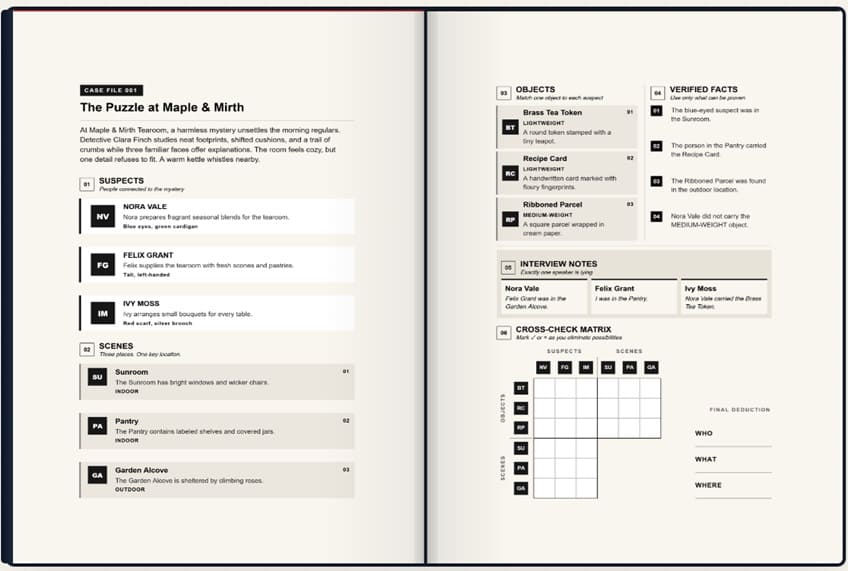
The system can generate cases containing suspects, locations, objects, clues, statements and solutions. The content is then transferred into ClueCraft, where the app automatically places those elements into a structured page layout.
You can choose from built-in themes such as Cozy Mystery, Detective, Spy, School, Fantasy, Sci-Fi, Historical and Treasure Hunt/Lost Relics—or enter your own custom theme. ClueCraft also supports multiple languages.

How Does ClueCraft Work Step by Step?
➤ Step 1: Choose Your Mystery Direction
First, decide what you want to create. Inside the Custom ClueCraft GPT, you select:
Language
Mystery theme
Incident type
Difficulty level
Number of cases
The system supports between 1 and 50 cases during the GPT generation process, with cases generated in convenient batches of five. For example, you could choose a school mystery with medium difficulty and create a collection of cases around missing trophies, false alibis or other school-related scenarios.
➤ Step 2: Generate the Mystery Cases
The Custom GPT generates structured mystery cases containing the information needed to build the puzzle. The cases use recognizable labels such as titles, suspects, facts and answers. The source material describes these as family-friendly, non-violent logic puzzles designed around a single solution involving who, what and where.
This is an important part of the system because you aren't simply asking AI to write random mystery stories. The output is structured specifically for the ClueCraft formatting workflow.
➤ Step 3: Copy and Paste Into ClueCraft
Once your batch is generated, you copy the Questions and Answers and paste them into the corresponding fields in the ClueCraft app.
This is where the automation becomes useful. ClueCraft uses what the product calls a Label Recognition Parser. It recognizes labels such as ### CASE, SUSPECT:, LOCATIONS: and ===ANSWERS===, then maps the information into the appropriate visual sections.
So instead of dragging text boxes around or manually formatting every clue, the application handles the page structure.
➤ Step 4: Preview and Export
After the content has been placed into the layout, you can preview your project and export it as: PDF, PNG, JPG. The front-end includes four page sizes: 8.25 × 11 inches, 8.5 × 11 inches, 8.27 × 11.69 inches and A4.
The front-end can support up to 30 mystery cases per project, with up to 69 structured pages when using the full 30-case configuration.

ClueCraft Review - Key Features
✅ Ready-Made Themes
Eight built‑in genres: Cozy Mysteries, Detective Cases, Spy Missions, School Mysteries, Fantasy Investigations, Sci‑Fi & Cyberpunk, Historical Mysteries, Treasure Hunts.
Plus unlimited custom themes — you can input any subject, setting, or niche in any language.
This flexibility means you can create for kids, adults, classrooms, or niche audiences without being locked into one style.
✅ Custom GPT Integration
Generates complete mystery cases in structured batches of five.
Each case includes suspects, clues, statements, and a single unique solution.
Ensures logical consistency — no contradictions or multiple valid answers.
Family‑friendly: designed for deduction puzzles without violent or homicide‑based content.
✅ Automatic Page Formatting
Intelligent Label Recognition Parser detects tags like ### CASE, SUSPECT:, and ===ANSWERS===.
Auto‑maps suspects, clues, and answers into polished layouts.
Eliminates the need for manual formatting, dragging, or font adjustments.
Saves hours of repetitive design work, especially for larger projects.
✅ Flexible Export Options
Export finished projects as PDF, PNG, or JPG.
Choose from four professional page sizes: 8.25×11, 8.5×11, 8.27×11.69, and A4.
Perfect for Amazon KDP publishing, classroom handouts, or printable packs.
✅ Multi-Language Support
Create mystery content in English, French, or any other language.
Expand your reach to international audiences and niche markets.
Ideal for bilingual classrooms or global publishing projects.
✅ Scalability
Supports up to 30 cases per project.
Projects can contain up to 69 structured pages, including covers, cases, and answer keys.
Scale from small printable packs to full puzzle books effortlessly.
✅ Beginner-Friendly Workflow
Step‑by‑step video training included.
Walkthroughs show exactly how to generate, paste, format, preview, and export.
Designed for creators with no prior design or technical experience.
✅ Exclusive Bonuses
When purchased during the launch window, ClueCraft includes four premium bonus packs valued at $168:
100 Profitable Mystery Niches – prompts for high‑demand, low‑competition niches.
300 Mystery Illustration Prompts – for generating artwork and clue graphics.
500 Mystery Cover Prompts – to create eye‑catching book covers.
500 Classroom Mystery Activity Prompts – for fun, educational detective activities.
✅ Structured Mystery Cases
Keeps suspects, clues, statements, and solutions organized in one consistent format.
Ensures every case is logic‑tight and enjoyable for the audience.
✅ Multiple Themes & Difficulty Levels
Choose from Easy, Medium, or Hard difficulty.
Adjust complexity for different age groups or skill levels.
Perfect for classrooms, family challenges, or advanced puzzle enthusiasts.
✅ Clean, Non-Murder Mysteries
Focuses on deduction puzzles without violent or graphic content.
Safe for children, classrooms, and family activities.
✅ One Workflow, Multiple Uses
Create books, printable packs, classroom activities, homeschool resources, games, or personal projects.
One system, multiple applications — you decide how to use the finished content.
How Much Does ClueCraft Cost?
❤️ ClueCraft Front End ($17)
I picked up ClueCraft mainly because I wanted to see whether the workflow could actually save me time when creating mystery content. At $17 as a one-time payment, the entry price felt pretty reasonable to me, especially since there’s no monthly subscription to keep paying.
What You Get With the Front-End Starter Package:

For me, the biggest value is having the whole process in one repeatable workflow. I can generate my cases, paste them into the app, format the pages and export the finished material without rebuilding the layout every time.
If you're already planning to create mystery books, printable puzzles, classroom activities or similar products, $17 is a fairly low-cost way to try the complete starter workflow.

The Upsells:
➡️ OTO1 – Edit Book + More Trims ($37)
Take your mystery books to the next level with visual editing power and expanded trim sizes.
Unlock 4 additional trim sizes (6×9in, 6.14×9.21in, 6.69×9.61in, 7×10in) — perfect for professional publishing standards.
Expand your projects to up to 50 cases per book, giving you more content and variety.
Use the WYSIWYG Visual Book Editor to preview and fine‑tune every page before exporting.
Ensure your final product looks exactly how you want it — polished, professional, and ready to publish.
➡️ OTO2 – Cover Design ($57)
Make your mystery books stand out with full cover customization.
Unlock the Cover Design module for complete creative control.
Customize colors, icons, and layouts to match your brand or niche.
Edit both front and back covers with ease.
Use the Include Covers toggle to decide whether to export with or without covers.
Your book’s first impression matters — this upgrade ensures it’s unforgettable.
➡️ OTO3 – Page Style + Unlimited ($67)
Scale your projects without limits and give your pages a unique look.
Create unlimited cases per book — ideal for large puzzle collections or full‑scale series.
Unlock full page styling options: background colors, accent colors, and block styling.
Add or remove page numbers with a simple checkbox.
Perfect for creators who want to build expansive mystery series with distinctive visual flair.
➡️ OTO4 – PLR & Source Access ($97)
The ultimate upgrade for serious creators — full ownership and rebranding rights.
Requires FE + OTO1 + OTO2 + OTO3.
Gain Full Private Label Rights (PLR License) — rebrand, edit, and sell ClueCraft as your own product.
Access complete Custom ChatGPT prompts and source files.
Unlock the full web app source code (HTML) for total customization.
Keep 100% of the profits from your rebranded product.
This is the powerhouse option for entrepreneurs who want to go beyond using ClueCraft — and start selling it under their own name.
Why Should You Choose ClueCraft?
My Personal Experience With ClueCraft:
For my test project, I created “Junior Detective Files” a collection of family-friendly mystery puzzles aimed at kids and families. I wanted something that could work as a printable product first, with the possibility of turning the best-performing cases into a larger book later.

The first thing I noticed was how much easier it was to get started. Instead of staring at a blank page wondering what kind of mystery to write, I used the included Custom GPT to choose my theme, difficulty and number of cases. I started with batches of five mysteries and then moved the ones I liked into ClueCraft.
The cases included suspects, locations, facts, clues and solutions, so I wasn't starting with a completely empty canvas. I still reviewed everything carefully because I didn't want to publish an AI-generated puzzle without checking whether the clues actually led to the intended answer.
Once I had the content I wanted, I pasted the Questions and Answers into ClueCraft. This was probably my favorite part of the whole process. Normally, I'd expect to spend quite a bit of time formatting each puzzle, creating consistent sections, arranging the clues and preparing answer pages. ClueCraft handled much of that repetitive work automatically.
For my first 30-case Junior Detective Files project, I ended up with a structured collection of pages that I could export and continue working on for my printable product.
I also used some of the included mystery illustration and cover prompts to create additional visual ideas. That helped me make the project feel more like an actual product rather than just a collection of AI-generated text.
🕵️♂️ School & Classroom Mysteries
🎨 Park, Hobby & Community Capers
🏕️ Camp, Outdoors & Nature Sleuths
🏆 Sports, Games & Arcade Whodunits
🍦 Neighborhood & Festival Fun
📜 Museum, Toy & Relic Mysteries
|
What About the Sales?
I want to be realistic here: I wouldn't look at ClueCraft as a magic “press a button and make money” system. The software creates the content and handles much of the formatting, but you still have to create a product people actually want, make the listing attractive, choose the right niche and market it.
I used Junior Detective Files as a small printable product rather than trying to launch a huge publishing business immediately. For the first-month, I sold 37 copies at $9.99, which would put the gross revenue at approximately $369.63 before platform fees, advertising and other expenses. That isn't a life-changing number, but I could create and test a complete product much faster than if I had manually written, structured and formatted every mystery from scratch.
If a particular theme started getting traction, I could then create another collection around it instead of spending weeks rebuilding my workflow.
What I Liked Most
After using ClueCraft for my project, the biggest benefit wasn't the AI itself. There are plenty of AI tools that can generate stories and puzzle ideas. It was the combination of generation and formatting. I could go from:
Theme → Mystery Cases → Structured Content → Formatted Pages → Export
without constantly jumping between different tools.
I also liked that I wasn't restricted to one type of mystery. The built-in themes gave me ideas when I wasn't sure what direction to take, while the custom-theme option meant I could create something much more specific for a particular audience.
The ability to create up to 30 cases in one project was another useful feature for me. It made ClueCraft feel more appropriate for creating an actual collection rather than just generating a one-off puzzle.
Would I Recommend ClueCraft?
After testing it with my Junior Detective Files project, I would recommend ClueCraft to someone who already has an interest in mystery puzzles, KDP, printables, educational resources or digital products.
I wouldn't recommend buying it simply because you hope an AI tool will automatically generate passive income. That's not how I approached it. I bought it because I wanted to reduce the amount of repetitive work involved in creating mystery products—and in that respect, it delivered a workflow I found genuinely useful.
The $17 one-time launch price also makes the experiment relatively inexpensive compared with paying for another monthly software subscription. If you're sitting on several mystery-book or printable ideas but haven't started because the writing, logic checking and formatting seem like too much work, ClueCraft is worth taking a closer look at.
🔴Conclusion
That’s all what I want to share with you about ClueCraft. I hope that my review can give you a helping hand in deciding what is best for you.
Important Reminder: When you purchase this product through my special link, you’ll unlock exclusive, valuable bonuses that you won’t find anywhere else! (Please note: these bonuses are only available with the full purchase-not with trial or free versions.)
To claim your bonus gifts, simply complete these two easy steps:
⏩ Step 1: Click the Buy Now button below to secure your copy of this product.

⏩ Step 2: Once your purchase is confirmed, just send a copy of your receipt to lokireviewteam@gmail.com. I’ll verify your order and personally send you all the details on how to access your bonus materials.


Comments