


SidebarBrain Review: The AI-Powered Command Center Every Solopreneur Needs?
- Paul

- 32 minutes ago
- 8 min read

What Is SidebarBrain?
SidebarBrain is a browser-based business dashboard created specifically for solopreneurs, digital marketers, content creators, affiliate marketers, coaches, and online business owners. Instead of forcing you to manage dozens of disconnected tools, SidebarBrain organizes your entire business into departments. Each department includes:
AI assistants
prompts
notes
bookmarks
tasks
launch planning
calendars
resources
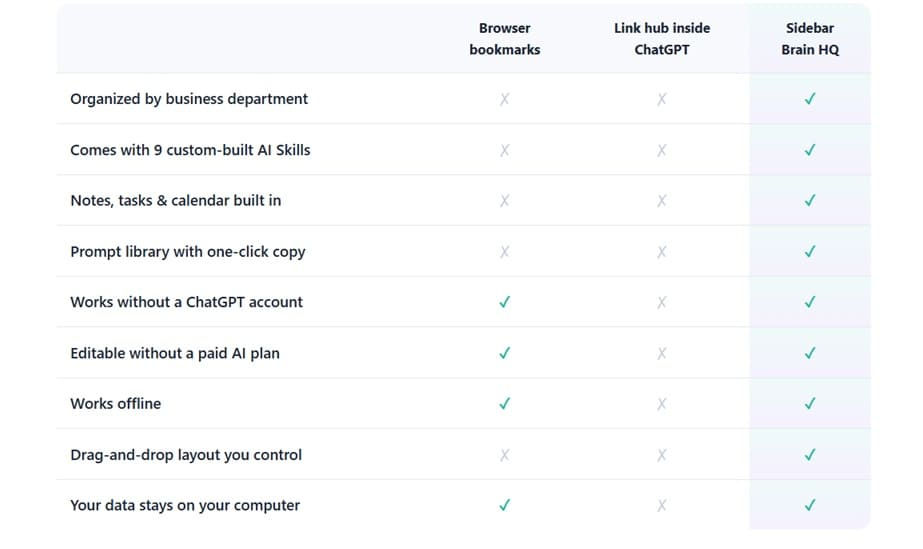
SidebarBrain ships with nine custom-built AI Skills already organized into business departments, allowing users to connect them with ChatGPT, Claude, Gemini, or other AI tools they already use. The dashboard installs like a desktop application on Windows, Mac, or even mobile devices while also providing a standalone offline file version that stores your data locally.
One of the biggest advantages is that you aren't locked into any particular AI platform. Whether you prefer ChatGPT, Claude, Gemini, or multiple services, SidebarBrain simply becomes the place where everything is organized.


About The Creator

SidebarBrain is the latest creation from Melody and Sharon, the team behind GPTs and Bots Unleashed. Over the past few years, they've built a solid reputation for developing AI-powered tools that help solopreneurs and digital entrepreneurs simplify their workflows instead of adding more complexity.
Beyond SidebarBrain, the duo has released a number of well-received products for the AI and digital marketing community. Some of their popular titles include The Solopreneur's Dashboard, Create Once, Sell Forever System (PLR Workshop Series), How To Build Your Own Custom GPT, The Idea To Income GPT Bundle – PLR, The Secret Society of AI Wizardry, and DFY: The Ultimate Gardener's Planner, Tracker & Journal, among others. Their product lineup reflects a consistent focus on helping creators, marketers, and business owners work smarter with AI.
SidebarBrain Review - Key Features
✅ Nine Custom-Built AI Skills
SidebarBrain ships with nine ready-to-use AI assistants, each tailored to a specific business function. Think of them as your virtual staff, each with a defined role:
Cara – Repurposes blogs, emails, or PLR into posts, carousels, and scripts.
Digi – Guides product development from idea to launch.
Instar – Provides Instagram growth strategies and captions.
Ivy – Crafts subject lines and newsletter drafts.
Juno – Builds email sequences that convert.
Lila – Manages affiliate programs and KPIs.
Max – Creates editorial calendars and launch plans.
Vex – Generates viral hooks for marketing.
Theo – Writes persuasive landing page copy.
These assistants integrate seamlessly with ChatGPT, Claude, or Gemini, giving you a ready-made team without payroll costs.
✅ Department-Based Organization
Instead of juggling bookmarks and apps, SidebarBrain organizes your business into departments:
Marketing & Traffic
Communications
Content Studio
Product Development
Sales & Copy
Customer Support
Operations & Admin
Each department card holds your tools, notes, and AI assistants, mirroring the structure of a real company.
✅ Today Screen
Your daily command center:
Open tasks across all departments.
Upcoming dates and deadlines.
Pinned assistants for quick access.
An autosaving brain-dump box for capturing ideas instantly.
This feature ensures you start each day with clarity instead of chaos.
✅ Launch Calendar
Plan and visualize your business roadmap:
Posts, promos, launches, and deadlines in one calendar.
Click a date, add a task, and see it coming.
Perfect for digital product sellers and content creators managing multiple campaigns.
✅ Instant Search
A single search bar lets you find:
Prompts
Notes
Tasks
Tools
Dates
No more wasted minutes hunting through folders or apps — everything is searchable in seconds.
✅ Prompt Library
SidebarBrain includes a one-click copy library for prompts, organized by department. With the Power Prompt Vault bonus, you get 50 preloaded prompts covering marketing hooks, newsletter frameworks, product outlines, and support replies. This eliminates blank-screen syndrome and accelerates productivity.
✅ Customization
SidebarBrain adapts to your workflow:
Drag-and-drop layout.
Rename departments and assistants.
Reorder cards and sections.
Switch between light and dark mode.
Add your own GPTs or AI tools.
It’s flexible enough to match how your brain works.
✅ Offline & Private
SidebarBrain prioritizes privacy and accessibility:
Works offline — no internet required.
Stores data locally on your computer.
Built-in backup and restore functionality.
Your information never leaves your device.
This makes it ideal for solopreneurs concerned about data security.
✅ Bonuses
During launch week, SidebarBrain includes three valuable bonuses:
Power Prompt Vault – 50 copy-paste prompts.
AI Staff Blueprints – Instructions to build two custom GPTs (Remy for support, Otto for admin).
10-Minute HQ Setup Guide – Quick-start manual for effortless installation.
Together, these bonuses add $53 in value to the $27 product.
✅ User-Friendly Design
SidebarBrain is designed for ease of use:
Installs like a real app with its own icon and window.
Opens in one second.
Clean white workspace by day, true black by night.
Intuitive interface praised by users in testimonials.
Even beginners can set it up in minutes.
✅ Free Lifetime Updates
Unlike subscription-based tools, SidebarBrain offers free automatic updates. New features are included at no extra cost, ensuring your dashboard evolves with your business.
How Much Does SidebarBrain Cost?
❤️ SidebarBrain Front End ($27)
One of the things that convinced me to give SidebarBrain a try was its pricing. During the launch period, it's available for a one-time payment of just $27, which I think is quite reasonable considering everything that's included.
My purchase came with:
SidebarBrain App Edition
File Edition (offline backup)
9 Custom AI Skills
Free lifetime updates
Power Prompt Vault
AI Staff Blueprints
10-Minute HQ Setup Guide
30-day money-back guarantee
After using it for a while, I actually appreciated the pricing model even more. So many productivity tools start with an affordable monthly fee, but after a year or two, you've easily spent a few hundred dollars just to keep using them. With SidebarBrain, I paid once and didn't have to worry about another subscription showing up on my credit card. I also like that the dashboard stores everything locally on my computer while still giving me lifetime updates.
If you're a solopreneur, affiliate marketer, content creator, or digital product seller who's tired of jumping between dozens of browser tabs and scattered notes, I think SidebarBrain is worth considering—especially while it's still available at the introductory launch price. And with the 30-day money-back guarantee, you can spend some time setting it up with your own workflow and decide whether it fits your business before making a long-term commitment.

The Upsells:
➡️ Order Bump – Prompt Vault PRO ($7)
For just $7, you can add Prompt Vault PRO, which includes 100+ additional prompts organized by business department. If you're constantly writing marketing copy, emails, social media posts, or planning product launches, this is an inexpensive upgrade that gives you plenty of ready-to-use prompts without having to build your own library from scratch.
➡️ OTO 1 – Automation Recipes ($27)
This upgrade is designed for users who want to get even more out of SidebarBrain. It includes seven ready-made automation workflows, 21 handoff prompts, a 90-day content calendar, and a scheduling guide that shows you how to connect the built-in AI Skills into repeatable systems.
If you're running regular content campaigns or launching products throughout the year, I think this is probably the most practical upgrade because it focuses on improving your workflow rather than simply adding more content.
➡️ OTO 2 – Multi Dashboard License ($27)
If you manage more than one business or work with clients in different niches, this upgrade makes a lot of sense. It lets you create up to five separate SidebarBrain dashboards, making it easy to keep each business completely organized without mixing prompts, notes, calendars, or resources together. For freelancers, agencies, or affiliate marketers promoting products across multiple niches, this can be a real time-saver.
➡️ OTO 3 – White-Label License ($147)
The White-Label License is aimed at entrepreneurs who want to turn SidebarBrain into part of their own business. It allows you to rebrand the dashboard, provide it to clients, bundle it with your own products or services, or even sell it under your own brand while keeping 100% of the profits.
It's definitely the most expensive upgrade, but it's also intended for a completely different audience. Unless you plan to offer SidebarBrain as part of your business or create your own branded software package, most users probably won't need this license.
Why Should You Choose SidebarBrain?
My Personal Experience With SidebarBrain:
I always prefer testing a new tool on a real client project before recommending it. That's how I know whether it genuinely improves my workflow or simply adds another app to my desktop. When I purchased SidebarBrain, I decided to use it while managing a content marketing campaign for one of my clients, who was launching a new digital resource called Business Growth Blueprint.

The project was fairly extensive. It included a 65-page business planning workbook, a lead magnet, a five-part email nurture sequence, a sales page, weekly newsletter content, social media posts for Facebook, Instagram, and LinkedIn, affiliate promotional materials, and a collection of AI prompt templates the client could continue using after the launch.
Normally, a project of this size would leave me switching between ChatGPT, Claude, Google Docs, Canva, Trello, Google Calendar, and several browser windows full of bookmarks and saved prompts. It's not unusual for me to have 25 or 30 tabs open at the same time, and finding a prompt or document I created a week earlier can easily waste 15 or 20 minutes.
This time, I used SidebarBrain as my central workspace from day one. I organized the project into different departments, connected my favorite ChatGPT assistants, saved all my prompts in the Prompt Library, tracked deadlines in the Launch Calendar, and stored every important link, note, checklist, and client resource inside the dashboard. I also found myself using the Brain Dump feature almost every day whenever a new content idea popped into my head.
The biggest difference wasn't that SidebarBrain magically wrote better copy—that still came from ChatGPT and my own editing. The real benefit was staying organized. Instead of constantly asking myself, "Where did I save that prompt?" or "Which version of the sales page is the latest?", everything was exactly where I expected it to be. The universal search alone saved me countless trips through folders and browser history.
The campaign launched about a week after we finished the content, and over the first 30 days, the client sold 118 copies of the Business Growth Blueprint at $47 each, generating just over $5,546 in gross revenue. While I can't say SidebarBrain was solely responsible for those sales—the quality of the offer, email marketing, and paid traffic all played important roles—it definitely helped me deliver a more organized and consistent campaign. Because everything was planned in one place, the messaging stayed aligned across the landing page, emails, social media posts, and promotional content.
From my own perspective, the biggest win was the amount of time I saved. I estimate SidebarBrain reduced my project management and content organization time by 30–40% compared to my usual workflow. Instead of wasting time searching through notes, bookmarks, and AI conversations, I could focus on writing, improving copy, and helping my client prepare for launch.
Since completing that project, SidebarBrain has become part of my daily routine. I now use it to manage my affiliate review articles, digital product launches, content calendars, and AI prompt collections. It has become the place where I organize my business, while ChatGPT and Claude remain the tools I use to create the content itself.
If you're a freelancer, affiliate marketer, content creator, coach, or solopreneur who feels like your business is scattered across dozens of browser tabs and apps, I genuinely think SidebarBrain is worth considering. It won't replace your favorite AI tools, but it gives them a proper home—and for me, that's made my workdays noticeably more productive and much less stressful.

🔴Conclusion
That’s all what I want to share with you about SidebarBrain. I hope that my review can give you a helping hand in deciding what is best for you.
Important Reminder: When you purchase this product through my special link, you’ll unlock exclusive, valuable bonuses that you won’t find anywhere else! (Please note: these bonuses are only available with the full purchase-not with trial or free versions.)
To claim your bonus gifts, simply complete these two easy steps:
⏩ Step 1: Click the Buy Now button below to secure your copy of this product.

⏩ Step 2: Once your purchase is confirmed, just send a copy of your receipt to lokireviewteam@gmail.com. I’ll verify your order and personally send you all the details on how to access your bonus materials.




Comments