


ProductSpark AI Review - Can a $9.95 Idea Tool Get You Past the Blank Page?

3 days ago
8 min read

Quick Summary
Product: ProductSpark AI
Creator: David Mills (David Mills LLC, founder of LearnWire)
Launch Date: September 30, 2026 at 8:00 AM CST, closing October 4 at 11:59 PM CST, sold through WarriorPlus
Front-End Price: $9.95 one-time 👉 Amazing Discounted Price Right Here! 📌
Category: Digital product idea generator and master prompt builder
Requirements: A browser and any AI chatbot (ChatGPT, Claude or Gemini). A free account works.
Refund Policy: 14-day money-back guarantee
Most people who want to sell a digital product don't get stuck on the building part. They get stuck one step earlier, staring at a chat window and typing "give me a digital product idea," then getting back the same ten generic suggestions everyone else gets. An hour later they have five half-ideas and nothing to build.
ProductSpark AI is a small tool aimed squarely at that moment. You tell it what you want to make, who it's for and how hard you want it to be, and it gives you ten product ideas and then a master prompt to build the one you pick. I used ProductSpark AI on a real product before launch to see whether the ideas are any better than what a blank ChatGPT chat gives you, and whether the upgrades are worth adding.
What Is ProductSpark AI? How Does It Work Step By Step?
ProductSpark AI is a browser app that does two jobs. First, it generates ten sellable digital product ideas matched to the format, niche, goal, skill level and complexity you choose. Second, it turns any idea you pick into a detailed master prompt you paste into ChatGPT, Claude or another AI chatbot to build the actual product.
It doesn't write the product itself. The writing happens in your own AI account. There's no signup either: you enter your license key once and everything, from ideas to prompts, is saved locally in your browser.
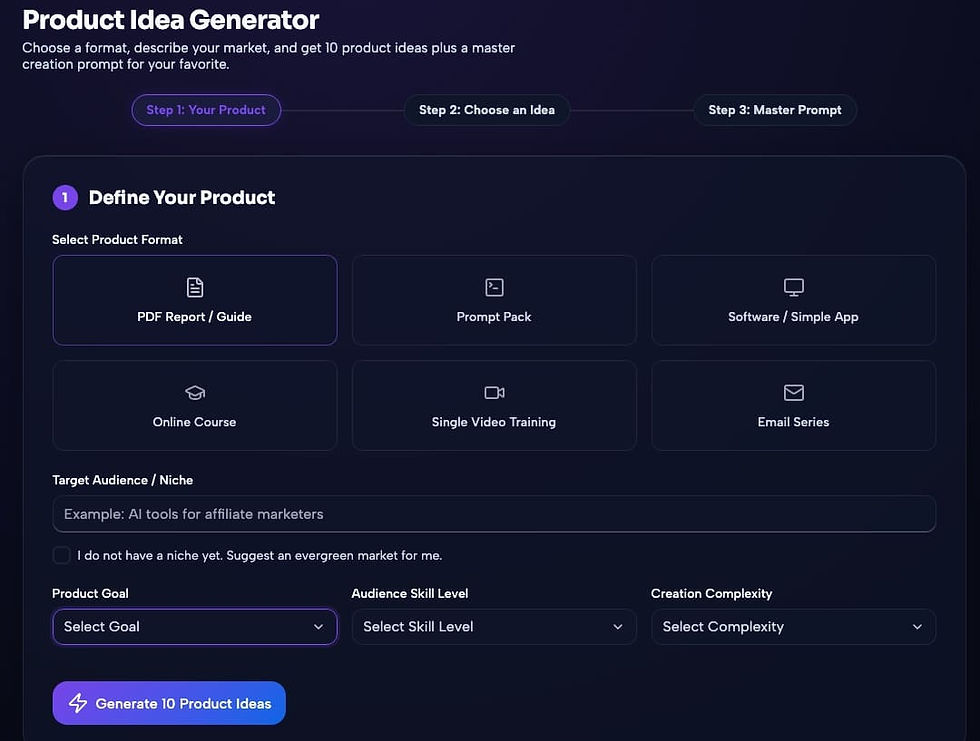
Here's how I worked through it, step by step:
➤ Step 1 — Enter your license key. Paste the key from your purchase and you're in. No account and no password. On a second device you enter the key again.
➤ Step 2 — Set up the brief. Pick a product format (ebook, guide, checklist, template, planner, mini course, prompt pack and more), your niche, your goal, your skill level and the complexity. If you have no niche in mind, it suggests an evergreen one.
➤ Step 3 — Compare ten idea cards. The ideas come back as separate cards, each with an angle and a buyer. You can generate a new batch, or ask for simpler or more premium versions, and each batch is saved on its own.
➤ Step 4 — Turn one idea into a master prompt. Click an idea and it writes a detailed prompt for building that product, split into the pieces you'll need, in the order you should build them.
➤ Step 5 — Copy, paste and build. One click copies the prompt. Paste it into your AI chatbot, review the output and assemble the product.
➤ Step 6 — Come back to it later. Every project sits on a Saved Projects page, with each idea keeping its own prompt, so you can switch between ideas without regenerating anything.
There's also an "affiliate bonus" product type, which creates bonus products you can give your audience when you promote someone else's launch. As an affiliate myself, that turned out to be the feature I used most after the first project.

About The Creator

ProductSpark AI comes from David Mills, the founder of LearnWire. He spent nearly 20 years in corporate work, reaching a senior director role, before starting a YouTube channel in 2019 reviewing software and AI tools. That channel became LearnWire, which now has more than 21,000 subscribers. He has earned over $700K in affiliate commissions as a top affiliate for AppSumo, WarriorPlus and JVZoo, and has sold simple digital products of his own on Gumroad, ThriveCart, Udemy, WarriorPlus, Etsy and Teachers Pay Teachers. What his background does suggest is that he has seen a lot of beginner tools up close, and this one is deliberately small.
ProductSpark AI Review - Key Features
✅ Ten ideas per batch: each idea comes on its own card with an angle and a buyer, so you can compare them side by side.
✅ Skill-level and complexity settings: ideas are matched to what you can realistically finish, which is the main reason beginners abandon products.
✅ Evergreen niche suggestions: if you don't know where to start, it picks a niche for you.
✅ Simpler, premium or new batches: refresh the ideas in three directions without losing earlier batches.
✅ Master prompt for every idea: a detailed, ordered prompt you paste into any AI chatbot to build the product.
✅ Many product formats: ebooks, guides, checklists, templates, planners, mini courses, prompt packs and more.
✅ Affiliate bonus mode: creates custom bonus products for launches you promote.
✅ Saved Projects page: every idea, selection and prompt saved automatically in one place.
✅ Private by design: your data stays in your own browser, with no account or password.
✅ No credits: use it as much as you like within fair use.

DEMO VIDEO
ProductSpark AI Pricing & Funnel Summary
ProductSpark AI Front End ($9.95)
The front end is $9.95, paid once, with no monthly fee and no credits. Checkout runs through WarriorPlus, and you get a license key to paste into the app. It's covered by a 14-day money-back guarantee, which means you can run your first batch of ideas and still get your money back if it doesn't help.
For that price you get the full idea generator, the master prompts, every product format including the affiliate bonus mode, the simpler and premium refresh options, and the Saved Projects page. You'll also need an AI chatbot to run the prompts. A free ChatGPT or Claude account works, though a paid plan handles the longer prompts better.
Is it worth $9.95? For a beginner stuck at the idea stage, I think yes. The honest comparison is with a free chatbot: you could ask ChatGPT for product ideas yourself, but you'd have to know how to set up the brief, and most people don't. What you're really paying for is a structured brief and a well-built prompt, and in my test the prompt did most of the heavy lifting. What the price doesn't buy you is a finished product or buyers. You still have to review what the AI writes, fix it, design it, list it and promote it.
💡 Value-for-Money Rating: 9.5/10
For beginners and affiliates who keep stalling before they start, this is a cheap, focused fix: better ideas, and a prompt that turns one into a real draft.

The Upsells:
➡️ OTO 1 — ProductSpark AI Pro, Full Funnel Creator ($14.95): extends the tool from a single product to a whole product funnel. The FAQ mentions this takes much more time to build.
➡️ OTO 2 — ProductSpark AI Email Sequencer ($19.95): writes email sequences to launch and sell the product you build.
➡️ OTO 3 — ProductSpark AI Graphics & Branding Kit ($14.95): helps with covers, graphics and branding for your product.
➡️ OTO 4 — ProductSpark AI Buyer Traffic ($24.95): focuses on getting buyers to your finished product.
Why Should You Choose ProductSpark AI?
My Personal Experience With ProductSpark AI
I had review access about ten days before launch. My brief was specific: a guide format, the freelance writing niche, the goal "sell a low-priced first product," beginner skill level and low complexity. I wanted to see whether it could find an angle I wouldn't have come up with myself.
The first batch of ten ideas was mixed. Four felt generic, and the other six had a clear buyer and a clear problem. I asked for a "simpler" batch, and one idea from that second batch stood out: a short pricing kit for new freelance writers who don't know what to charge. I called the finished product "The Freelance Writer's First Rate Card Kit".

The master prompt split the product into pieces and put them in order. I pasted it into Claude, worked through each part and edited as I went.
Here's what the finished kit contained:
Part 1 — Why Your First Rate Feels Wrong: a short opener on per-word, per-hour and per-project pricing, and why beginners undercharge.
Part 2 — The Rate Calculator Worksheet: a fill-in page that works backward from a monthly income goal to a project rate.
Part 3 — Three Sample Rate Cards: blog posts, email newsletters and product descriptions, each with a basic, standard and premium tier.
Part 4 — The "What's Your Rate?" Reply Scripts: five short replies for when a client asks your price, including "I have a small budget."
Part 5 — Raising Your Rates Checklist: a one-page checklist for when and how to raise prices with existing clients.
Part 6 — Scope Creep Email Template: a polite email for when a project grows beyond what was agreed.
One reply script I kept almost word for word from the AI draft: "My standard rate for a 1,000-word blog post is $120, which includes one round of edits. If you'd like a smaller piece to start, I can do a 500-word post for $65." It's simple, but it's exactly what a nervous beginner needs to see written down.
The whole kit took me about four hours across two evenings, including around 90 minutes of editing. The AI's first sample rates were too high for true beginners, so I rewrote them from my own freelance years..
I listed it on Gumroad at $9 and shared it with my email list and in two freelance writing groups where promotion is allowed. In the first nine days it sold 14 copies, which came to around $126. After that, I used the affiliate bonus mode to build a small bonus for a launch I was promoting, which took about 40 minutes. Not a big result, but it's a finished product that exists, which is more than my notes app had managed in months.
Comparison Table: ProductSpark AI vs. Alternatives
Option | Cost | Idea Quality | Build Guidance | Beginner Friendly |
ProductSpark AI | $9.95 one-time | Matched to your skill level | Ordered master prompt | Yes |
Asking ChatGPT directly | Free | Generic unless you prompt well | You work it out | Only if you know how to prompt |
A digital products course | Often $97 or more | Depends on the teacher | Detailed | Slow, lots of theory |
Buying PLR products | Varies per pack | Same content others own | Product already made | Yes |
Final Verdict on ProductSpark AI
ProductSpark AI does one small job well: it gets you from "I have no idea what to make" to a specific idea and a prompt that actually builds it. My rate card kit went from a vague notion to a listed product in two evenings, and most of the credit goes to how the prompt organized the work. It won't do the editing, design or selling for you, and the ideas aren't backed by market research. But if you keep stalling before you start, I think ProductSpark AI is worth considering while the $9.95 launch price is still available. Start with the front end, and add the Email Sequencer or Buyer Traffic upgrades only once you have a product you want to push harder.
That's all what I want to share with you about ProductSpark AI. I hope that my review can give you a helping hand in deciding what is best for you.
Important Reminder: When you purchase this product through my special link, you’ll unlock exclusive, valuable bonuses that you won’t find anywhere else! (Please note: these bonuses are only available with the full purchase-not with trial or free versions.)
To claim your bonus gifts, simply complete these two easy steps:
⏩ Step 1: Click the Buy Now button below to secure your copy of this product.

⏩ Step 2: Once your purchase is confirmed, just send a copy of your receipt to lokireviewteam@gmail.com. I’ll verify your order and personally send you all the details on how to access your bonus materials.


Comments