


One Prompt Apps Review - Build Complete Web Apps in Minutes?

Feb 17
8 min read
One Prompt Apps Review

Most marketers have at least one idea for a software tool.
Maybe it’s a content generator.
Maybe a niche SEO checker.
Maybe a lead magnet tool.
But the moment you think about building it, reality hits:
You either need to
learn coding
hire a developer
or duct-tape 7 different tools together
And that’s usually where the idea dies.
Enter One Prompt Apps, a workshop and system designed to eliminate that gap. With a single prompt and a no-code builder, marketers can create fully functional web apps in just 10 minutes. This is a practical, tested method that has already produced hundreds of apps, some generating six figures in revenue.
In this review, I’ll break down what One Prompt Apps is, who created it, its key features, pricing, pros and cons, and share my personal experience using it to build my own project. By the end, you’ll know whether this tool is the missing piece in your marketing arsenal.
What Is One Prompt Apps?
One Prompt Apps is a live workshop and system that teaches marketers how to build complete SaaS web applications using a single AI-powered prompt. Instead of dragging and dropping for hours or learning to code, you paste one refined prompt into a no-code builder (like Base44) and watch as a full-featured app materializes in minutes.
The apps aren’t basic landing pages—they include advanced features such as:
User authentication (including Google sign-in)
Admin dashboards with user management
AI integrations (OpenAI, Claude, Gemini)
Research tools powered by APIs like Perplexity
Email capture and ConvertKit integration
Exit-intent popups and onboarding flows
WordPress auto-posting capability
Legal pages, profile management, and more
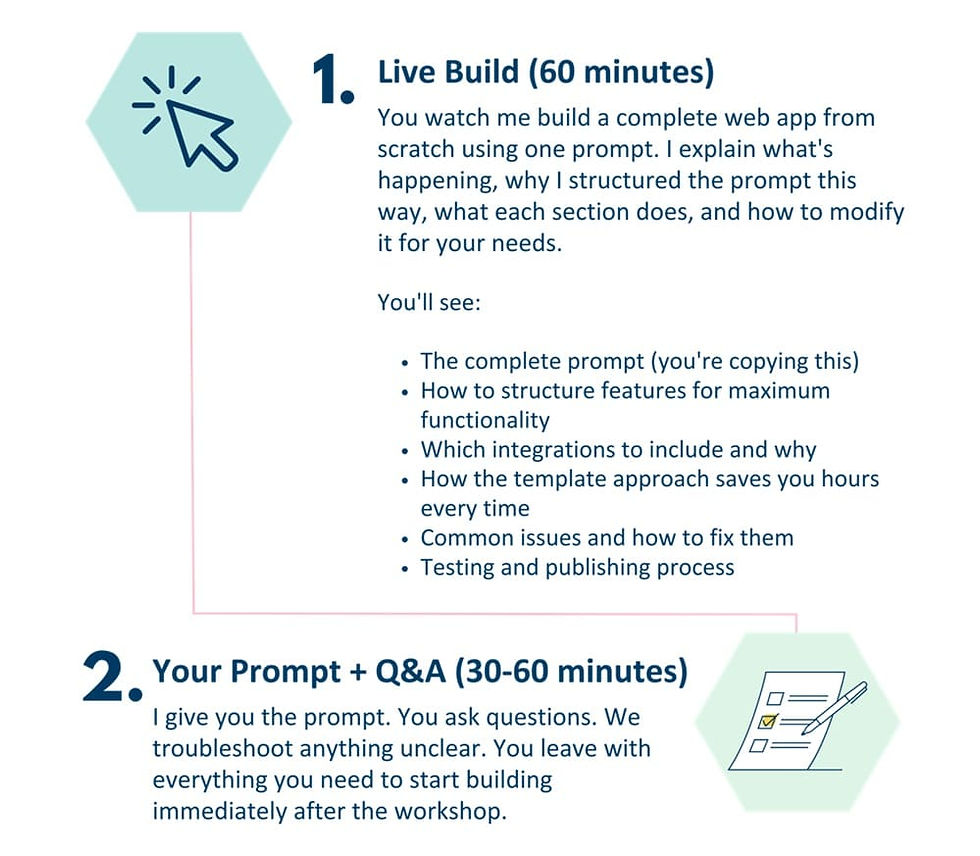

Essentially, One Prompt Apps gives you a template strategy: build one solid foundation with all the core features, then clone and modify it for different niches. This means you can launch multiple tools quickly, test ideas faster, and scale without developer bottlenecks.

About The Creator

One Prompt Apps is created by Tony Hayes — a long-time marketer, SEO product creator, and the mind behind KISS Internet Marketing. Tony built his reputation by solving marketing problems with practical tools. Using the same system taught inside this workshop, he has created over 200 web apps.
Some of his better-known tools include Rank Mesh (an SEO ranking checker), SEO Sneakies (traffic research and analysis), and Channel Content Pilot (a YouTube content planning system). He’s even taken a single template and duplicated it into 40 niche variations — covering industries like real estate, gyms, and daycare centers — which really shows how repeatable the method is.
Beyond those, he has released a long list of marketing-focused products such as PDF Profit Engine, Local Traffic Commando, Insider Traffic Vault, Affiliate Profit Finder, Easy CustomGPT Builder, Affiliate Content Pilot, TubeWizard, SEO Content Pilot and many more.
One Prompt Apps Review - Key Features
✅ The “One Prompt” Web App Framework
The core of One Prompt Apps is a refined master prompt designed to generate a complete web application structure inside an AI no-code builder. Instead of starting with a blank project and figuring out what pages you need, the system produces a ready-made app foundation. You’re not assembling pieces — you’re editing an existing product.
The generated framework includes:
Secure user login system (including Google sign-in)
User dashboard interface
Settings and profile management
Built-in navigation structure
Editable modules for your tool logic

✅ Complete Marketing Tool Architecture
Most tutorials show how to build a single feature. This system builds a full product environment. Your app doesn’t just “work” — it behaves like a sellable SaaS tool.
The template automatically includes:
Landing page
Onboarding walkthrough
Exit-intent capture
Instruction page
Update log section
Legal pages (privacy & terms)
Admin control panel
✅ Built-In AI Integrations
The template is designed to work with multiple AI models right away. You can create tools such as:
Content generators
SEO analyzers
Research assistants
Idea generators
Data processors
You don’t manually wire everything together — you mainly adjust the prompts and output behavior to match your niche.
✅ Clone-And-Modify System
This is honestly the real strategy behind the training. You don’t build a new app every time.
You build one strong template… then duplicate it.
Examples of how this works:
Create a blog idea generator → clone → make a YouTube idea generator
Create a local SEO analyzer → clone → make a restaurant SEO analyzer
Create a lead magnet tool → clone → make a client demo tool
✅ Admin Management & User Control
The generated apps include an admin area so you can manage users without additional software. You can:
View registered users
Control access
Manage features
Update content
✅ Email List & Lead Capture Integration
The template supports email capture functionality out of the box. Meaning you can use your app as:
a lead magnet
a free tool funnel
a client acquisition asset
✅ WordPress & Automation Compatibility
The framework also supports publishing workflows. You can adapt tools to:
generate content
export results
publish to websites
assist content production pipelines
✅ Real-Time Workshop Demonstration
The training includes a full live build recording. You watch the entire process happen step-by-step — no skipped sections, no prepared shortcuts. This is important because most AI tutorials fail when you try them yourself. Seeing the full workflow prevents that confusion and shows exactly how to troubleshoot.
✅ Transformation Prompts
Besides the main template, you also receive additional prompts that help convert the base app into different types of tools. Instead of guessing how to adapt the structure, you follow guided transformations that reshape the same framework into new products.
✅ Future-Proof Workflow Skill
The biggest feature isn’t actually the app itself — it’s the workflow you learn. After using it once, you understand:
how to structure tool ideas
how to instruct AI builders properly
how to iterate quickly
How Much Does One Prompt Apps Cost?
❤️ One Prompt Apps Front End ($37)
One Prompt Apps costs $37 as a one-time payment, which honestly surprised me.
Inside, you get:

What you’re really buying isn’t just a video — it’s the starting blueprint. After following along, you end up with a working marketing web app that already has logins, dashboards, AI tools, and integrations built in. From there you tweak the purpose and it becomes your own tool — something you can use privately, offer as a lead magnet, or even package as a product.
The part that clicked for me was the cloning concept. You build one solid base app once… then duplicate it and reshape each copy into a completely different tool. That makes the effort compound instead of starting over every time.
So if you’ve ever caught yourself thinking: “I could make this tool if I knew how” or “I’m tired of waiting on developers just to test an idea” — this training will probably feel very relevant.
For perspective, $37 is less than a single hour of developer time. The only extra expense is the no-code builder subscription (Base44 starts around $20/month), which you’d need anyway to host your apps.
If building small useful tools has been sitting on your “someday” list, this is one of those low-risk ways to actually try it and see if it fits your workflow.

➡️The Upsells:
FE Order Bump: My No-Fail Winning Product Idea Strategy – $19 (Brainstorm hits that actually sell—no more guessing.)
OTO1: LeadMagnet Apps Workshop – $37 (Build lead-gen machines in minutes.)
OTO2: AI Copywriting Workshop – $37 (Prompts for copy that converts on autopilot.)
OTO3: WarriorPlus Setup & Traffic Workshop – $37 (Launch and drive traffic like a pro.)
OTO3 Bump: My Personal YouTube Channel Placements List (Targeting WarriorPlus buyers) – $9.95 (Ready-made promo spots for instant exposure.)
OTO4: YouTube Traffic Bundle – $47 (Scripts, tools, and tactics for viral views.)
OTO5: Viral Content Pilot – $197 (Split pay available) (The ultimate system for content that spreads like wildfire.)
Why Should You Choose One Prompt Apps?
My Personal Experience With One Prompt Apps:
When I first joined the One Prompt Apps workshop, I wasn’t sure what to expect. I’ve tried a few no-code platforms before, and while they were useful, they often left me spending hours dragging blocks around just to get something basic working. The idea of building a complete app in 10 minutes felt almost too good to be true.
I help a few local businesses — a café, a bakery, and a small gym — and every week I was answering the same questions:
“What should I post today?”
“What promotion should we run this month?”
“What do I reply to this lead?”
I’d send voice notes, write examples, or make Google Docs… and they’d still come back asking again later. I decided to build one small tool for each client and see if they would actually use it.
⏩Client #1 — Café: Social Media Assistant

The café owner struggled with daily posting. Not laziness — just decision fatigue. She had products but didn’t know how to turn them into content consistently.
So I built a tiny web app where she logs in and fills 2 fields:
Drink or product of the day
Mood (cozy / promo / new item / weekend)
The tool outputs:
Caption options (short + long)
Story text version
Photo angle ideas (top-down, counter shot, customer shot)
Hashtag groups separated by local & discovery
Soft promotion suggestion (bundle, add-on, limited-time)
Two weeks later she showed me a planned posting schedule — something she’d never done before. Not viral growth. But consistent posting without me pushing her. And the interesting part: She started asking me about ads because now she actually had content worth promoting.
⏩Client #2 — Bakery: Monthly Campaign Planner
The bakery didn’t lack ideas — they lacked timing. They remembered holidays when it was already too late to prepare. So I cloned the café tool and changed the logic.

Inside the app:
Select month
Choose product category (cake, bread, pastry, gift box)
Choose goal (foot traffic / pre-orders / awareness)
It generates:
Weekly promotion themes
Bundle ideas
Counter display wording
SMS announcement message
Email announcement draft
Simple urgency angles
They ran a planned Mother’s Day pre-order campaign instead of a last-minute post. They told me the big difference wasn’t higher traffic — it was less chaos inside the shop. They prepared earlier. Staff knew what was happening. And they asked me to keep maintaining their marketing monthly.
⏩Client #3 — Gym: Lead Conversation Assistant
The gym had leads coming in — but conversations died after the first message. The trainer didn’t like sales talk, so he replied short and neutral. I built a simple follow-up assistant.

What the tool asks
Lead goal (lose weight / muscle / general fitness)
Experience level
Objection (price / time / nervousness)
It outputs
Friendly reply message
Follow-up message after 24h
Trial invite script
Encouragement version
Answer to common objections
After a few weeks, he told me conversations felt less awkward because he wasn’t improvising. No miracle numbers — but more booked trial sessions and fewer ignored leads.
Why It Worked
What impressed me most wasn’t just the features—it was the speed. Normally, these projects would have required weeks of back-and-forth with a developer, costing thousands. Instead, I delivered working tools in days. Were they perfect? No. I had to tweak some features and polish the design. But they worked, and they delivered value right away.
That’s the real strength of One Prompt Apps: it bridges the gap between idea and execution. It doesn’t make you a developer, but it makes you someone who can ship tools fast. And in marketing, speed is everything. The person who executes first usually wins.
If you’re a marketer, entrepreneur, or small business owner, One Prompt Apps gives you the power to turn ideas into working tools without the usual delays and costs. For me, it’s been the difference between letting ideas die in the planning stage and actually shipping tools that clients use and pay for.

🔴Conclusion
That’s all what I want to share with you about One Prompt Apps. I hope that my review can give you a helping hand in deciding what is best for you.
Important Reminder: When you purchase this product through my special link, you’ll unlock exclusive, valuable bonuses that you won’t find anywhere else! (Please note: these bonuses are only available with the full purchase-not with trial or free versions.)
To claim your bonus gifts, simply complete these two easy steps:
⏩ Step 1: Click the Buy Now button below to secure your copy of this product.

⏩ Step 2: Once your purchase is confirmed, just send a copy of your receipt to lokireviewteam@gmail.com. I’ll verify your order and personally send you all the details on how to access your bonus materials.


Comments