


InfoPrompts AI Review — 30 Prompts, One ChatGPT Window

4 days ago
7 min read

📌 Quick Summary
Product: InfoPrompts AI
Creator: Ken Bluttman
Front-End Price: $27 👉 Amazing Discounted Price Right Here! 📌
What It Is: A library of 30 ready-made ChatGPT prompt frameworks that turn any topic into a polished, scroll-stopping infographic
Best For: Social media creators, bloggers, course sellers, lead-magnet builders, coaches, and affiliate marketers who aren't designers
What Is InfoPrompts AI? How Does It Work Step By Step?
InfoPrompts AI is a cloud-based library of 30 pre-built infographic "frameworks" — things like Checklist, Timeline, Decision Tree, Pyramid, Before And After, Myth vs Fact, and Cause And Effect — that you pair with your own topic to produce a finished, ready-to-paste prompt. You copy that prompt into ChatGPT (or another compatible AI image tool), and it generates the actual graphic.
The part that actually saves time is skipping the prompt-writing itself. Left to my own devices, I'd type something like "make me an infographic about X" and get back a flat, generic result, then spend twenty minutes rewording it to get something usable. This system replaces that guesswork with a structure that's already been worked out for you.
Here's the step-by-step flow as I worked through it:
➤ Step 1 — Enter Your Topic. You type in whatever subject you're covering — I tried everything from a fitness tip to a marketing checklist, and the tool accepted plain, everyday phrasing without needing any special formatting.
➤ Step 2 — Pick A Framework. You choose which of the 30 layouts fits what you're trying to say — a Checklist for action steps, a Timeline for a process, a Myth vs Fact layout for correcting a misconception, and so on.
➤ Step 3 — Choose Your Color Scheme And Size. Six color palettes (Light, Dark, Bright, Soft/Pastel, Bold, and Natural/Earthy) and six size options (Portrait, Square, Tall, Story/Reel, Presentation, and Editorial) let you match the graphic to whatever platform it's going on before you ever generate anything.
➤ Step 4 — Add An Optional CTA Or Branding Footer. If you want a small call-to-action line or your handle at the bottom of the graphic, you can turn that on here — it's optional, so plain educational graphics stay clean if you don't need it.
➤ Step 5 — Copy The Finished Prompt Into ChatGPT. The tool hands you a complete, ready-to-paste prompt. Drop it into ChatGPT's image generation and the infographic comes out the other side in well under a minute.

There's no limit tying you to 30 total infographics, either — the "30" refers to the number of frameworks, and you can run any of them against as many topics as you want, in any niche.

About The Creator

Ken Bluttman is the name behind InfoPrompts AI, and he's built a reputation in the software-and-training space as a "$1,500,000+ product creator" with a background as a web developer and course author. This isn't his first release built around content creation and productivity tools — before this launch he put out Launch-O-Matic, a training product on planning and releasing a product from start to finish, along with Low Content Creation Machine, and training programs including Micro Apps Mastery and App Launch Lab. That kind of track record is part of why I felt comfortable buying on launch day — this is someone who's been shipping products in this space for a while, not someone testing the waters with a first launch.
InfoPrompts AI Review - Key Features
Here's what's actually included once you're inside:
✅ 30 Ready-Made Infographic Frameworks: Checklist, How It Works, Comparison, Decision Tree, Pyramid, Timeline, Cause And Effect, Cheat Sheet, and 22 more — each one is a pre-built prompt structure, not a blank page you have to fill in yourself.

✅ Topic-To-Prompt Generator: You type in a plain-language subject instead of trying to write a working prompt from scratch — the tool converts it into a full, structured prompt automatically.

✅ 6 Color Schemes: Light, Dark, Bright, Soft/Pastel, Bold, and Natural/Earthy give each graphic a different mood without you touching a color picker.
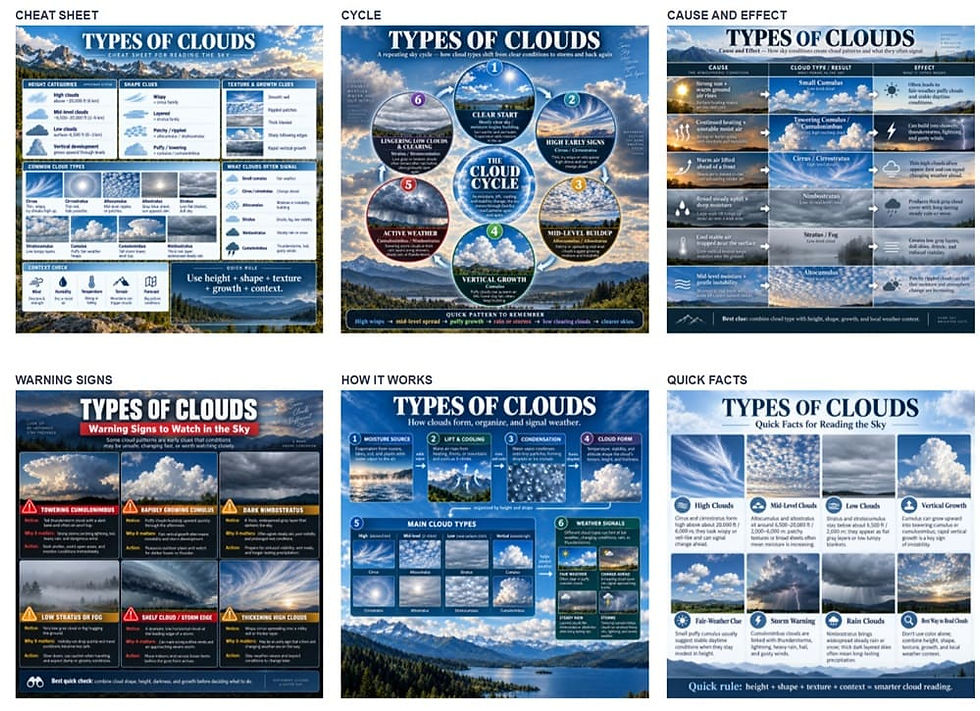
✅ 6 Size And Aspect-Ratio Options: Portrait, Square, Tall, Story/Reel, Presentation, and Editorial cover Instagram, Pinterest, slide decks, and blog headers without any manual cropping.
✅ Optional CTA / Branding Footer: A toggle to add a call-to-action line or handle at the bottom of a graphic, left off entirely when you just want a clean educational piece.
✅ Cloud-Based, Browser-Only Access: Nothing to install — the platform runs in a browser, and every prompt it generates gets pasted into whatever AI image tool you already use.
✅ Unlimited Topics And Niches: The 30 frameworks aren't a cap on how many infographics you can make — you can run every framework against as many topics as you want, in any niche.
✅ Full Commercial Rights: Anything you generate is yours to use in client work, your own content, or products you sell.
InfoPrompts AI Pricing & Funnel Summary
InfoPrompts AI Front End ($27)
Checkout ran through WarriorPlus and took under a minute, unlocking the full front-end system for a one-time $27 during the launch window, down from the regular $47 listed on the page. That covers all 30 frameworks, every color scheme and size option, the topic-to-prompt generator, and the optional CTA footer — there's no separate charge for the tool itself, though you'll still need your own access to ChatGPT or another compatible AI image generator to actually produce the graphics. I also read the guarantee before buying: it's a straightforward 30-day, no-questions "if for any reason you're not satisfied" refund, which is about as low-risk as a purchase like this gets.
Is the front end worth $27 on its own? For anyone already posting infographics regularly — even a couple a week — I think it clearly is. A single custom infographic from a freelance designer typically runs $20 to $50, and a Canva Pro subscription alone costs more than this over a year without ever handing you a written prompt structure to work from.
💡 Value-for-Money Rating: 9.5/10
For anyone posting regularly to Instagram, Pinterest, or a blog, $27 for 30 reusable frameworks across six sizes and six color schemes is an easy yes — it replaces the trial-and-error of writing your own prompts every time you want a new style.

The Upsells:
➡️ OTO 1 — InfoPrompts AI Pro ($37): This adds 30 more frameworks on top of the front end's 30, along with premium visual directions the vendor describes as letting you "create dramatically different looks from the same topic." If you're publishing often enough that the original 30 layouts start feeling repetitive, this is the upgrade that fixes that.
➡️ OTO 2 — InfoPrompts AI Carousels ($37): This one shifts from single graphics to multi-slide social carousels, with the AI organizing a topic into a logical slide sequence — a hook slide, the educational content, and a closing takeaway. If most of your content lives on Instagram or LinkedIn carousels rather than single-image posts, this is the more directly useful of the two upgrades.
Why Should You Choose InfoPrompts AI?
My Personal Experience With InfoPrompts AI
For my test run, I picked a niche I already post in occasionally: beginner personal finance. I built a 12-piece Instagram and Pinterest content series called "The Broke To Budgeted Blueprint," designed to promote a small budgeting starter kit I sell as a digital download, and I ran the whole series through the Bold color scheme in the Portrait and Story/Reel sizes since those are what perform best on my existing accounts.

I picked a different framework for each piece so the series didn't feel repetitive. Here's a sample of what made the final set:
Card 1 — The 5-Minute Budget Checklist: a Checklist-framework graphic walking through the five steps to set up a first monthly budget
Card 3 — Budgeting Myths vs Facts: a Myth vs Fact layout correcting five common misconceptions about needing a "big income" to budget
Card 5 — The Debt Payoff Roadmap: a Timeline-framework graphic showing a 6-month snowball payoff plan
Card 6 — Before And After: My First Budget: a Before And After layout contrasting a chaotic spending month against a planned one
Card 7 — Where Your Paycheck Actually Goes: a Pyramid-framework breakdown of needs, wants, and savings
Card 9 — Signs You're Heading Toward Debt: a Warning Signs layout listing five early spending red flags
Card 10 — Budgeting Mistakes To Avoid: a Mistakes-framework graphic covering the five most common first-timer errors
Card 12 — Your 30-Day Money Reset Cheat Sheet: a Cheat Sheet layout recapping the whole series into one shareable summary graphic, with the CTA footer switched on to point to my starter kit
One line from the Myth vs Fact card, written out in full: "Myth: You need a big income to budget. Fact: A budget doesn't create money — it tells the money you already have where to go."
Start to finish, including picking topics, generating all 12 prompts, running them through ChatGPT, and posting the series across two platforms, the whole project took me a little under four hours spread across three evenings — most of that time went into re-generating two graphics where the AI image tool rendered text with a typo, and into lightly adjusting the CTA wording on the closing cheat-sheet card. Every other card came out usable on the first or second try, which is a lot better than my usual hit rate writing prompts from scratch.
I posted the series over about two weeks, and in that time my starter kit sold 34 copies and brought in around $187 — nothing close to a full-time income, but a clear early signal for a content series that took under half a workday to produce.
Final Verdict on InfoPrompts AI
After running a real 12-piece content series through it, I think InfoPrompts AI does what it says on the tin: it takes the guesswork out of prompting ChatGPT for infographics and replaces it with a structure that's already been thought through. It won't hand you a finished, pixel-perfect brand asset with zero review, and you'll still need your own AI image tool to actually generate anything — but for $27, if you're already creating social or blog content regularly, I think it's worth considering, especially while the launch price is still on the table.
Important Reminder: When you purchase this product through my special link, you’ll unlock exclusive, valuable bonuses that you won’t find anywhere else! (Please note: these bonuses are only available with the full purchase-not with trial or free versions.)
To claim your bonus gifts, simply complete these two easy steps:
⏩ Step 1: Click the Buy Now button below to secure your copy of this product.

⏩ Step 2: Once your purchase is confirmed, just send a copy of your receipt to lokireviewteam@gmail.com. I’ll verify your order and personally send you all the details on how to access your bonus materials.


Comments