


ECover AI Studio Review – Create Professional eCovers and Product Mockups with AI-Powered Prompts
- Paul

- 2 hours ago
- 7 min read
What Is ECover AI Studio?
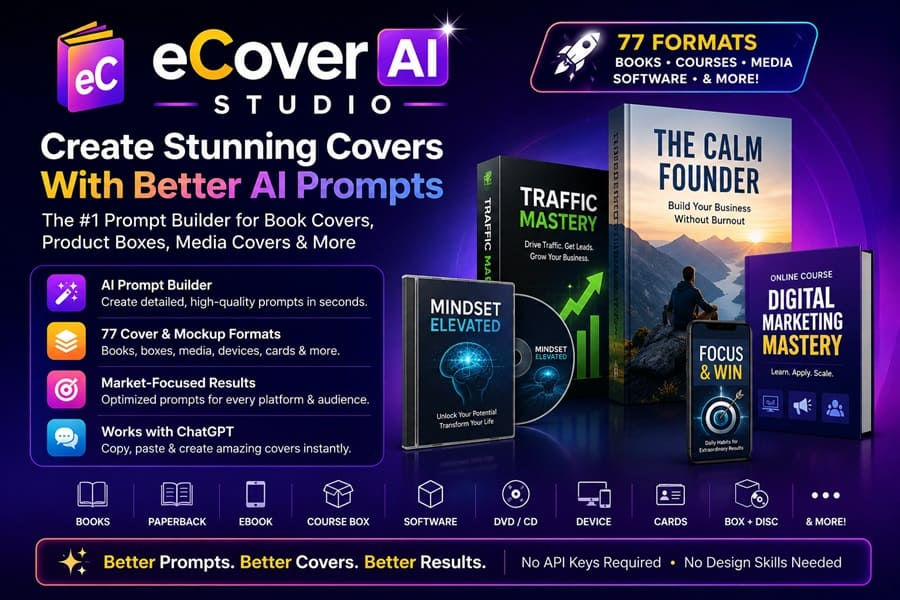
ECover AI Studio is an AI-powered prompt generation tool designed to help users create professional cover images and mockups using ChatGPT image generation. Instead of creating images directly, the software generates highly detailed prompts tailored to specific cover formats, industries, platforms, and use cases.
The tool helps users create prompts for:
Kindle eBooks
Paperback books
Fiction books
Non-fiction books
Coloring books
Journals
Course boxes
Software boxes
DVD covers
CD covers
Vinyl covers
Membership cards
Event passes
Podcast artwork
Mobile app mockups
Device screens
Lead magnets
Product boxes
Training manuals
And dozens more
The Pro version includes an impressive 77 different cover and mockup formats, making it suitable for almost any digital or physical product concept. Unlike traditional eCover software that relies on static templates, ECover AI Studio focuses on helping ChatGPT understand exactly what kind of image you want to generate.

How Does ECover AI Studio Work? (Step-by-Step)
➤ Step 1: Enter Your Product Information
Start by entering information about your project, such as:
Product title
Book description
Sales page URL
Product summary
Creative brief
➤ Step 2: Select Your Use Case
Choose the type of project you're creating:
Book Cover
Course Cover
Software Box
Membership Program
Lead Magnet
Music Product
Video Course
Coaching Program
Affiliate Bonus
Training Package
The software automatically adjusts the prompt structure based on your selection.
➤ Step 3: Choose Platform and Format
Next, select where the cover will be used. Examples include:
Amazon KDP
Kindle
Audible
Etsy
Gumroad
Sales Pages
Checkout Pages
Social Ads
YouTube Thumbnails
You can also select the exact format you want:
Paperback
Hardcover
Box Mockup
Device Screen
DVD Case
CD Jewel Case
Membership Card
Software Box
➤ Step 4: Select Style Preferences
Choose a design direction such as:
Premium
Authority
Modern
Minimalist
Marketplace-Friendly
Bold Promotional
Thumbnail Optimized
These style choices influence the final prompt generated.
➤ Step 5: Generate Your Prompt
ECover AI Studio instantly creates a detailed ChatGPT-ready prompt containing:
Visual direction
Audience targeting
Typography hierarchy
Readability instructions
Design guidelines
Platform requirements
Composition suggestions

➤ Step 6: Paste Prompt into ChatGPT
Copy the generated prompt and paste it into ChatGPT's image generator. The result is a much more refined and professional cover concept than what most users can create with a generic one-line prompt.

ECover AI Studio Review - Key Features
✅ Prompt Builder
ECover AI Studio transforms rough ideas — like a book title, product description, or sales page URL — into detailed, structured prompts ready for ChatGPT. These prompts include product context, audience, platform, genre, format, text hierarchy, styling, and practical image-generation rules. This ensures your AI-generated covers are intentional, readable, and market-fit.

✅ 77 Formats (Pro Edition)
The Pro version unlocks 77 individual cover and mockup formats, ranging from Kindle eBook covers and paperback mockups to CD jewel cases, software boxes, membership cards, and device screens. This breadth of formats makes it versatile for authors, course creators, marketers, musicians, software sellers, and coaches.
✅ Use-Case Presets
Instead of writing prompts from scratch, you can select presets tailored to your product type: books, KDP low-content, training courses, music media, video training, software, memberships, affiliate bonuses, and more. This ensures the generated prompt is specific to your chosen use case.
✅ Platform Guidance
Prompts are adapted for different platforms such as Amazon/KDP, Audible, sales pages, checkout images, social ads, YouTube thumbnails, Etsy, Gumroad, and transparent PNG assets. Each platform has unique requirements, and this feature ensures your covers are optimized for the right environment.
✅ Prompt Variations
You can instantly shift the creative direction of a prompt toward premium, marketplace, bold promo, or thumbnail-first versions without rewriting the entire brief. This flexibility allows you to test different styles quickly.
✅ Transparent Background Option
Generate isolated PNG-style cover assets that can be layered onto sales pages, checkout blocks, ads, and mockups. This is especially useful for marketers who need versatile visuals for multiple campaigns.
✅ Commercial-Friendly Prompts
The tool includes built-in rules for readability, market fit, clean composition, and platform-appropriate presentation. It avoids common AI pitfalls like fake badges, warped lettering, or tiny unreadable text, ensuring your covers look professional and trustworthy.
✅ Sample Outputs
ECover AI Studio provides real cover examples made from its prompts. These samples showcase polished book covers, product boxes, media-style visuals, and course graphics, giving users confidence in the tool’s capabilities.
✅ Organized Workflows
The tool is structured around real creator workflows. Authors, course creators, marketers, musicians, software sellers, and coaches can pick their market first, then the format. This narrows choices so prompts feel tailored instead of random.
✅ Beginner-Friendly Design
No Photoshop, no Canva template hunting, and no API keys required. The tool runs in your browser, guiding you step by step. Even users with zero design background can create professional-looking prompts.
✅ Advanced Creative Direction (Pro Edition)
For professionals and client work, Pro offers advanced controls to fine-tune creative direction. This includes genre-specific guidance, platform optimization, and deeper presets for more complex projects.
✅ Commercial Use Ready
You can use the prompts for your own projects or client work, subject to the terms of the AI image tools you use. This makes it suitable for freelancers, agencies, and digital entrepreneurs.
How Much Does ECover AI Studio Cost?
One thing I appreciated about ECover AI Studio is how straightforward the pricing is. There are no monthly fees, no complicated upgrade paths, and no API costs to worry about.
Standard Edition – Free
If you just want to test the platform, the Standard Edition gives you access to 10 popular cover and mockup formats, including paperback books, hardbacks, eBooks, workbooks, CDs, DVDs, product boxes, software boxes, box-and-disc combinations, and device screen mockups.
You also get access to style presets, use-case templates, transparent background options, and built-in prompt rules that help improve text accuracy in your AI-generated covers.
Pro Edition – $16.90 One-Time
This is the version I purchased, and honestly, it's where the real value is. For a small one-time payment, the Pro Edition unlocks all 77 cover and mockup formats, giving you far more flexibility whether you're creating book covers, online courses, software products, memberships, lead magnets, or promotional graphics.
It also adds specialized presets for books, KDP publishing, courses, media products, software, and digital offers. On top of that, you get platform-specific guidance, genre recommendations, prompt variations, and advanced creative direction controls that help produce much better results inside ChatGPT.
What I liked most is that everything is included for a single payment. No subscriptions, no hidden upsells required to make the software useful, and no extra tools needed to get started.
After using the Pro version for several projects, I genuinely think $16.90 is a fair price.
Before finding ECover AI Studio, I would often spend hours tweaking prompts or pay freelancers to create simple product mockups. Even basic eCover designs can easily cost $20–$50 each, and more polished designs often cost considerably more.
With ECover AI Studio Pro, I can generate detailed, professional-quality prompts whenever I need them, whether it's for an eBook, a course launch, a software offer, or a lead magnet. The time savings alone have made the purchase worthwhile for me.

Why Should You Choose ECover AI Studio?
My Personal Experience With ECover AI Studio:
I purchased the Pro version of ECover AI Studio because I regularly create review bonuses, digital products, and lead magnets, and I was looking for a faster way to create professional-looking graphics without spending hours in Canva or hiring a designer.
To test it properly, I used it for a project called AI Marketing Launch Kit, a bundle that included:
A 90-page AI marketing guide
150 ready-to-use ChatGPT prompts
Social media content templates
Email swipe files
A resource vault with additional training materials

Normally, creating graphics for a project like this is one of my least favorite parts of the launch process. Even when using AI image generators, I often spend a lot of time experimenting with prompts before getting something that looks professional enough for a sales page.
With ECover AI Studio, the workflow was much smoother. I entered my product title and description, selected a product box mockup along with a device screen bundle, and chose a premium marketing style. Within minutes, the software generated a highly detailed prompt that I copied directly into ChatGPT.
The first set of images was already much better than the generic prompts I usually write myself. After a few minor tweaks, I ended up with several polished graphics, including a software-style box, workbook mockup, tablet screen, and promotional banner that I used throughout my sales page.
The biggest benefit wasn't necessarily getting "perfect" graphics instantly—it was how much time I saved. Instead of spending two or three hours testing random prompts, I had a complete set of usable marketing visuals ready in less than 30 minutes.
The project went on to generate 67 sales and just over $1,800 in revenue during the first few weeks. While I wouldn't claim the graphics alone were responsible for those results, having professional-looking product images definitely improved the presentation of the offer and made the sales page feel more credible.
Since then, I've also used ECover AI Studio for several review bonuses, lead magnets, and mini-products. The variety of formats available in the Pro version means I rarely have to start from scratch anymore.
What impressed me most is that this isn't trying to replace ChatGPT or become another complicated design platform. Instead, it solves a very specific problem: helping you create better prompts that lead to better-looking covers and mockups.
If you're someone who frequently launches eBooks, online courses, software tools, memberships, or affiliate bonuses, I think you'll get a lot of value from ECover AI Studio. At the current one-time price, it's a small investment that can save a significant amount of time and help your products look far more professional.
🔴Conclusion
That’s all what I want to share with you about ECover AI Studio. I hope that my review can give you a helping hand in deciding what is best for you.
Important Reminder: When you purchase this product through my special link, you’ll unlock exclusive, valuable bonuses that you won’t find anywhere else! (Please note: these bonuses are only available with the full purchase-not with trial or free versions.)
To claim your bonus gifts, simply complete these two easy steps:
⏩ Step 1: Click the Buy Now button below to secure your copy of this product.

⏩ Step 2: Once your purchase is confirmed, just send a copy of your receipt to lokireviewteam@gmail.com. I’ll verify your order and personally send you all the details on how to access your bonus materials.


Comments